


Keyless entry systems have become a popular choice for homeowners and businesses seeking both convenience and enhanced security. Among these, keypad deadbolt locks stand out for their blend of robust protection and user-friendly access. Instead of fumbling for keys or worrying about lost copies, users can simply enter a code to unlock their doors. This guide explores the leading keypad deadbolt options, the features that set them apart, and what you should know before making a purchase.
Modern electronic deadbolts offer a range of benefits, from eliminating the need for traditional keys to providing advanced features like temporary codes, auto-locking, and integration with smart home systems. Whether you’re upgrading your home’s security or looking for a reliable solution for a rental property, understanding the available choices is crucial.

Before diving into the top-rated products, it’s important to consider the overall security of your door setup. For example, reinforcing the door frame can significantly improve the effectiveness of any deadbolt. To learn more, see how to strengthen a door frame for better deadbolt security.
Why Choose a Keypad Deadbolt?
Switching to a keypad deadbolt offers several practical advantages over traditional locks. Here are some of the main reasons homeowners and property managers are making the change:
- Keyless convenience: No more carrying, losing, or duplicating keys.
- Customizable access: Create temporary or permanent codes for family, guests, or service providers.
- Improved security: Many models feature auto-locking, tamper alarms, and lockout functions after repeated incorrect entries.
- Audit trails: Some smart keypad locks keep a record of who enters and when, which is useful for monitoring access.
- Easy integration: Many options work with smart home systems, allowing remote locking and unlocking via smartphone apps.
Top-Rated Keypad Deadbolt Locks for Secure Entry
With a wide range of models on the market, choosing the right keypad deadbolt can feel overwhelming. Below are some of the most trusted and feature-rich options available today, each catering to different needs and budgets.
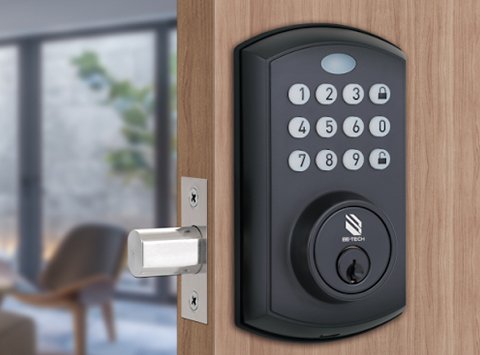
Schlage Encode Smart WiFi Deadbolt
The Schlage Encode is a standout for those seeking a balance of security, convenience, and smart features. It connects directly to your WiFi network, eliminating the need for additional hubs. Users can create up to 100 unique access codes and manage them remotely. The lock is compatible with Amazon Alexa and Google Assistant, enabling voice control and real-time notifications.
- Built-in alarm technology for added security
- Easy installation with standard tools
- Durable, weather-resistant construction
Kwikset SmartCode 888 Touchpad Electronic Deadbolt
Known for its straightforward installation and user-friendly interface, the Kwikset SmartCode 888 is ideal for families and rental property owners. It supports up to 30 customizable user codes and features a backlit keypad for easy use in low light. The lock integrates with Z-Wave smart home systems, allowing remote access and monitoring.
- One-touch locking for quick security
- Auto-lock after 30 seconds
- SmartKey Security for easy re-keying
Yale Assure Lock SL Key Free Touchscreen Deadbolt
Yale’s Assure Lock SL offers a sleek, key-free design with a responsive touchscreen. It can be upgraded with modules for compatibility with Z-Wave, Zigbee, or WiFi, making it a flexible choice for smart home enthusiasts. The lock supports up to 250 unique codes (with a network module) and features voice guidance for setup and use.
- Completely keyless design for enhanced security
- Weather-resistant and suitable for exterior doors
- Optional integration with Apple HomeKit, Alexa, and Google Assistant
August Wi-Fi Smart Lock (4th Generation)
While not a traditional keypad deadbolt, the August Wi-Fi Smart Lock is worth mentioning for its ability to retrofit onto existing deadbolts. It allows users to unlock the door using a smartphone, voice command, or Apple Watch. For those who prefer a physical keypad, the August Smart Keypad (sold separately) can be added for PIN code entry.
- Easy installation without replacing existing hardware
- Remote access and guest key sharing
- Auto-lock and unlock based on proximity
Key Features to Consider When Choosing a Keypad Deadbolt
To select the right lock for your needs, compare these essential features:
- Number of user codes: More codes mean more flexibility for families, guests, or service providers.
- Power source: Most electronic deadbolts use batteries. Check for low-battery indicators and emergency power options.
- Weather resistance: For exterior doors, ensure the lock is rated for outdoor use.
- Smart home compatibility: If you use Alexa, Google Assistant, or Apple HomeKit, look for locks that integrate seamlessly.
- Security certifications: Look for ANSI/BHMA ratings for assurance of strength and durability.
- Physical key override: Some models offer a backup key option, while others are completely keyless for added security.
Installation and Maintenance Tips
Most keypad deadbolts are designed for DIY installation, fitting standard door preps with just a screwdriver. Here are some tips for a smooth setup and long-term reliability:
- Read the manufacturer’s instructions carefully before starting.
- Ensure your door and frame are properly aligned to prevent binding.
- Test the lock thoroughly after installation, including all user codes and backup methods.
- Replace batteries as soon as the low-battery indicator appears.
- Regularly update access codes and remove unused ones for better security.
For additional security, consider reinforcing your door hardware. The deadbolt strike plate importance is often overlooked but can make a significant difference in resisting forced entry.
Security Considerations and Smart Lock Risks
While keypad deadbolts offer many advantages, it’s important to be aware of potential vulnerabilities. Electronic locks can be susceptible to hacking, power failures, or wear on the keypad. To minimize risks:
- Choose models with encryption and tamper alarms.
- Change codes regularly and avoid obvious combinations.
- Keep firmware updated if your lock supports smart features.
- Consider a backup entry method, such as a hidden mechanical key or emergency power contacts.
If you’re concerned about digital security, you may want to read more about can smart deadbolts be hacked and how to protect your home from cyber threats.
Additional Resources for Home Security
Upgrading to a keypad deadbolt is just one part of a comprehensive home security strategy. For more tips on keeping your property safe, check out these resources:
For a deeper dive into different types of deadbolts and their benefits, see this comprehensive guide to deadbolt lock types and benefits.
Frequently Asked Questions
Are keypad deadbolt locks as secure as traditional locks?
High-quality keypad deadbolts are generally as secure as their mechanical counterparts, especially when installed correctly and paired with reinforced door hardware. Look for models with ANSI/BHMA certification and features like anti-tamper alarms for added peace of mind.
What happens if the batteries die in my keypad lock?
Most electronic deadbolts provide low-battery warnings well in advance. Many models offer a backup key or emergency power contacts (such as a 9V battery terminal) to allow entry if the batteries are completely drained. Always check the manufacturer’s recommendations for your specific model.
Can I install a keypad deadbolt myself?
Yes, most keypad deadbolts are designed for DIY installation and fit standard door preps. Basic tools like a screwdriver are usually sufficient. However, if your door or frame is misaligned, or if you want to maximize security, consider professional installation.


