Key fobs are essential for modern vehicle access and convenience, but over time, their buttons can wear out, become unresponsive, or even fall off. If you’re experiencing issues with your car remote, you don’t necessarily need to replace the entire device. With the right approach, you can restore functionality and save money. This guide will walk you through practical steps for how to fix damaged key fob buttons, including diagnosis, repair, and when to seek professional help.
Before diving into the repair process, it’s helpful to understand how these remotes work and what might cause their buttons to fail. If you’re curious about the technology behind your remote, you can learn more about what frequency do key fobs use and how it impacts reliability and range.
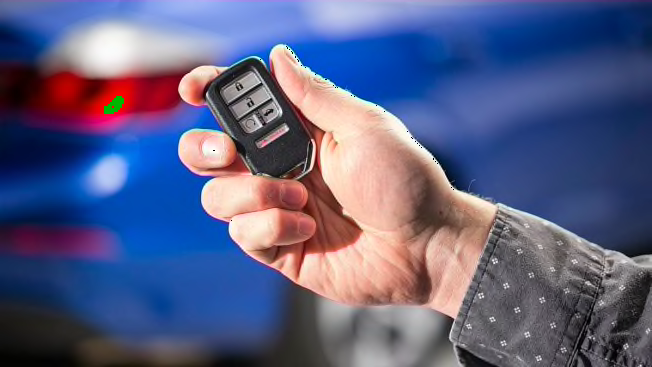
Common Causes of Key Fob Button Failure
Understanding why your remote’s buttons stop working is the first step to an effective repair. The most frequent causes include:
- Wear and Tear: Repeated pressing can degrade the rubber membrane or plastic caps over time.
- Moisture Damage: Exposure to water or humidity can corrode internal contacts.
- Dirt and Debris: Dust and grime may accumulate under the buttons, blocking electrical contact.
- Battery Issues: A weak or dead battery can mimic button failure.
- Internal Circuit Problems: Solder joints or circuit traces may crack or break, especially if the remote is dropped.
Identifying the root cause will help you choose the right repair method and avoid unnecessary replacements.
Diagnosing Unresponsive Remote Buttons
If your remote isn’t working as expected, start with these troubleshooting steps:
- Check the Battery: Replace the battery with a new one, making sure it’s installed correctly. For more details on power sources, see do key fobs use batteries.
- Test All Buttons: Determine if only one button is affected or if the entire remote is unresponsive.
- Inspect for Physical Damage: Look for cracks, missing pieces, or obvious signs of wear on the button surface.
- Try a Spare Remote: If you have a backup, see if it works. This can help isolate the problem to the remote or the vehicle’s receiver.
Once you’ve pinpointed the issue, you can move on to repairing the affected buttons.
Step-by-Step Guide to Restoring Key Fob Buttons
The process for repairing damaged key fob buttons is straightforward and requires only basic tools. Here’s how to get started:
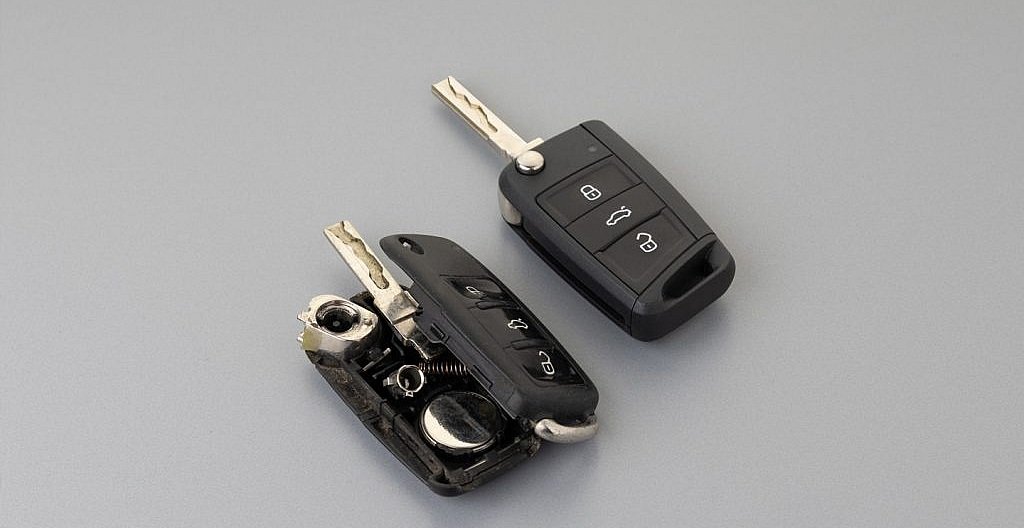
1. Open the Remote Case
Most remotes snap apart or are held together with small screws. Use a small flathead screwdriver or a plastic pry tool to gently separate the halves. Be careful not to damage the circuit board inside.
2. Clean the Button Contacts
Dirt and oxidation are common culprits behind unresponsive buttons. Use a cotton swab dipped in isopropyl alcohol to gently clean the contacts on both the circuit board and the underside of the rubber button pad. Allow everything to dry completely before reassembly.
3. Repair or Replace the Button Pad
If the rubber pad is torn or the conductive material is worn away, you have a few options:
- Purchase a replacement pad online, matching your remote’s make and model.
- Use a conductive repair kit to restore the contact surface.
- For minor cracks, a small dab of conductive glue or aluminum foil can sometimes restore function temporarily.
4. Inspect and Repair the Circuit Board
Examine the board for broken traces or loose solder joints. If you spot damage and have soldering experience, you can reflow joints or bridge small breaks with conductive paint. Otherwise, consult a professional.
5. Reassemble and Test
Carefully snap or screw the remote back together. Test all buttons before returning to regular use. If the issue persists, the problem may be deeper within the electronics, and replacement may be necessary.
When to Replace or Reprogram Your Remote
Sometimes, repairs aren’t enough. If the circuit board is severely damaged or the remote won’t respond even after cleaning and pad replacement, it may be time for a new device. Some vehicles require remotes to be programmed to the car’s security system. For more information about the differences between remote types, see key fob vs smart key.
If you’re unsure about programming or compatibility, consult your vehicle’s manual or a trusted locksmith. Many professionals offer same-day service for remote replacement and programming.
Tips for Preventing Button Damage in the Future
- Keep your remote dry and avoid exposure to rain or spills.
- Clean the exterior regularly to prevent dirt buildup.
- Use a silicone cover to protect against drops and wear.
- Replace the battery at the first sign of weakness to prevent leakage.
- Store your remote away from keys and objects that could scratch or press the buttons unintentionally.
Understanding Different Types of Car Remotes
Not all remotes are created equal. Some use basic radio frequency, while others incorporate smart key or push-to-start technology. For a deeper dive into the various types and their features, check out this comprehensive guide to car key types.
Knowing your remote’s technology can help you make informed decisions about repair, replacement, and security.
Frequently Asked Questions
Can I fix a key fob button myself, or do I need a professional?
Many button issues can be resolved at home with basic tools and a little patience. Cleaning contacts, replacing batteries, and swapping out worn pads are all DIY-friendly. However, if you encounter circuit board damage or programming issues, it’s best to consult a locksmith or your dealership.
How do I know if the problem is the button or the battery?
If none of the buttons work, the battery is the most likely culprit. If only one button fails while others function, the issue is probably with the button itself or the underlying contact. Replacing the battery is a quick first step to rule out power issues.
Is it safe to use conductive glue or foil for button repairs?
Conductive glue or foil can be a temporary fix for worn contacts, but it’s not a permanent solution. Use these methods with caution, and avoid letting conductive material bridge unintended parts of the circuit, which could cause shorts.
Do I need to reprogram my remote after repairing the buttons?
In most cases, simple repairs like cleaning or pad replacement won’t affect programming. However, if you replace the entire circuit board or purchase a new remote, programming may be required.
What should I do if my remote still doesn’t work after repair?
If cleaning and pad replacement don’t restore function, the issue may be with the circuit board or the vehicle’s receiver. Consider seeking help from a locksmith or dealership for further diagnosis and possible replacement.